Subscription Only
Tutorial 10: Step-By-Step Guide to Printing Open Customer Entries in FFLAssist
Step 1: After login in to your Business Central portal — You will be landed on the “FFL Assist” portal. Step 2: Click on the…...
Step 1: After login in to your Business Central portal — You will be landed on the “FFL Assist” portal. Step 2: Click on the…...
You must be a subscriber to access this content.
Step 1: After login in to your Business Central portal — You will be landed on the “FFL Assist” portal. Step 2: Click on the…...
You must be a subscriber to access this content.
Step 1: After login in to your Business Central portal — You will be landed on the “FFL Assist” portal. Step 2: Click on the…...
You must be a subscriber to access this content.
Step 1: After login in to your Business Central portal — You will be landed on the “FFL Assist” portal. Step 2: Click on the…...
You must be a subscriber to access this content.
Step 1: After login in to your Business Central portal — You will be landed on the “FFL Assist” portal. Step 2: Click on the…...
You must be a subscriber to access this content.
Step 1: After logging into your Business Central portal, you will be directed to the FFLAssist dashboard. Step 2: Click on the menu item “FFL…...
You must be a subscriber to access this content.
Step 1: After login in to your Business Central portal — You will be landed on the “FFL Assist” portal. Step 2: Click on the…...
You must be a subscriber to access this content.
Step 1: After login in to your Business Central portal — You will be landed on the “FFL Assist” portal. Step 2: Click on the…...
You must be a subscriber to access this content.
Step 1: After login in to your Business Central portal — You will be landed on the “FFL Assist” portal. Step 2: Click on the…...
You must be a subscriber to access this content.
Step 1: After login in to your Business Central portal — You will be landed on the “FFL Assist” portal. Step 2: Click on the......
Step 1: After login in to your Business Central portal — You will be landed on the “FFL Assist” portal. Step 2: Click on the......
Step 1: After login in to your Business Central portal — You will be landed on the “FFL Assist” portal. Step 2: Click on the......
Step 1: After login in to your Business Central portal — You will be landed on the “FFL Assist” portal. Step 2: Click on the......
Step 1: After login in to your Business Central portal — You will be landed on the “FFL Assist” portal. Step 2: Click on the......
Step 1: After login in to your Business Central portal — You will be landed on the “FFL Assist” portal. Step 2: Click on the......
Step 1: After logging into your Business Central portal, you will be directed to the FFLAssist dashboard. Step 2: Click on the menu item “FFL......
Step 1: After login in to your Business Central portal — You will be landed on the “FFL Assist” portal. Step 2: Click on the......
Step 1: After login in to your Business Central portal — You will be landed on the “FFL Assist” portal. Step 2: Click on the......
Completing an ATF Form 4473 digitally can seem technical at first, but with FFLAssist, the process is simple, secure, and fully compliant. This Digital 4473......
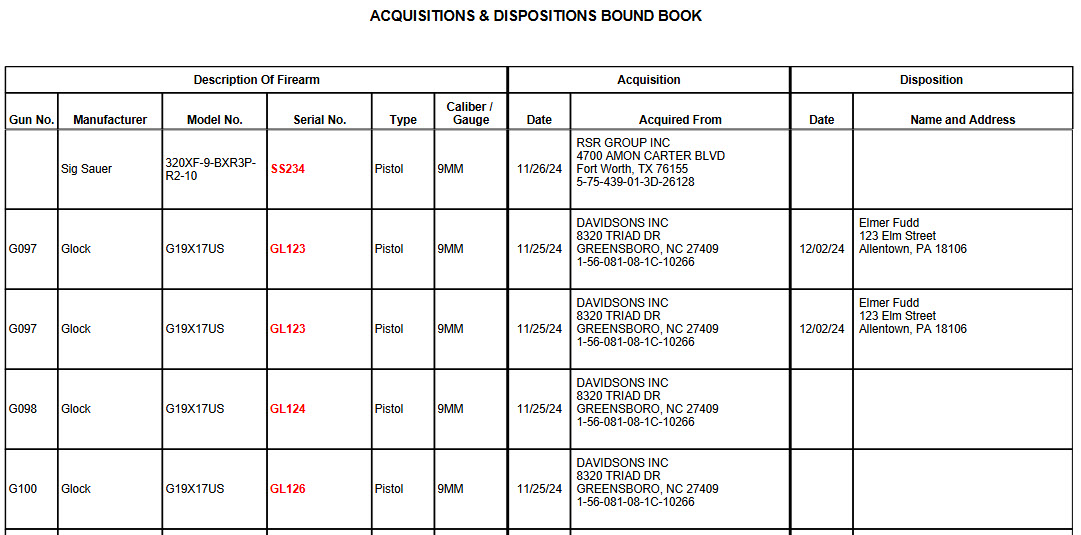
With FFLAssist, multiple A&D books are no longer needed.
FFLAssist's "Wizards" functionality is the sweet spot of the entire application and makes 4473 completion a joy to undertake.