

You are suddenly contacted by the ATF, which wants to audit your business. Do you worry? Do you panic? You are a customer of FFLAssist, so do you say to yourself, “How is my IOI going to audit my records? Do I have to give him access to my system? Do I have to look over his shoulder while he conducts his audit so he doesn’t navigate to other system areas?”
I was asked these very same questions by the retired ATF field inspector I hired. He asked, “With FFLAssist, how do you offer up records to the inspector for inspection?” “Do you give the inspector a login and hand him/her your laptop running FFLAssist?”
I responded that I have a problem with giving the inspector the same wide-open access to FFLAssist that gun store owners (our customers) have, because FFLAssist is not a smartphone app that one can easily train on in a few minutes after downloading. It requires training to be effective, and dealers do not have the time to train the inspectors, nor do the inspectors have time to train themselves.
But more importantly, the inspector should only be able to see those areas of the system that are important to the audit. They don’t need access to other areas of the system not involved in the audit.
So, I had to figure out a way for the inspector to be self-sufficient quickly with the absolute minimum of training on FFLAssist, and a minimum of record visibility, so they get in, do their inspection, and get out. My hired field inspector agreed.
The solution…a new “ATF IOI Profile.” With this new profile, all these questions are answered. This is a very limited view of your FFLAssist data, which requires zero training by the inspector. You, the dealer, change your computer display to the ATF IOI Profile and hand the computer to the inspector, or provide a desk with a computer running FFLAssist in your gun store where they can sit down and conduct their audit.
Without any formal training on how FFLAssist works, the inspector can ONLY view 4473s, the A&D Book, and your firearm inventory. That’s it! That is all they will have access to. They cannot see your financial statements, your customer list, your non-firearm inventory, or how many purchase orders you have recently issued to your distributors.
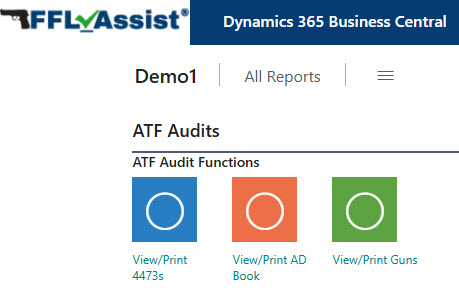
This profile has three menu icons on the screen: “View/Print 4473s”, “View/Print A&D Book”, and “View/Print Gun Inventory”. The inspector merely clicks one of the colored squares. This screen does NOT contain menu icons for “View Financial Statements” or “View Open Purchase Orders”. The ability for the inspector to navigate or snoop around has been disabled. The inspector simply clicks on one of those three menu choices. They can view 4473s on the screen, or they can print them out if the dealer has the computer connected to a printer. They can view the A&D Book filtered for specific records, such as Lost/Stolen guns, for example. They can print that filtered list or save it as PDFs for off-site analysis.
My hired ATF inspector really likes this new approach and told me that inspections should be conducted much quicker since inspectors no longer have to rifle through file cabinets looking for specific 4473s.
